📊 Dashboard
| Project Name | Programs | High Risk | Avg Score | Analyzed | Actions |
|---|---|---|---|---|---|
|
No projects yet. Use Upload & Analyze in the sidebar to start. | |||||
📤 Upload & Analyze
Other files (e.g. PL/I, Assembler, files without extension) are recognised and listed in the report.
.cbl .cob .cobol
.jcl .jclproc
.map .bms
.cpy .copy
.sql .ddl
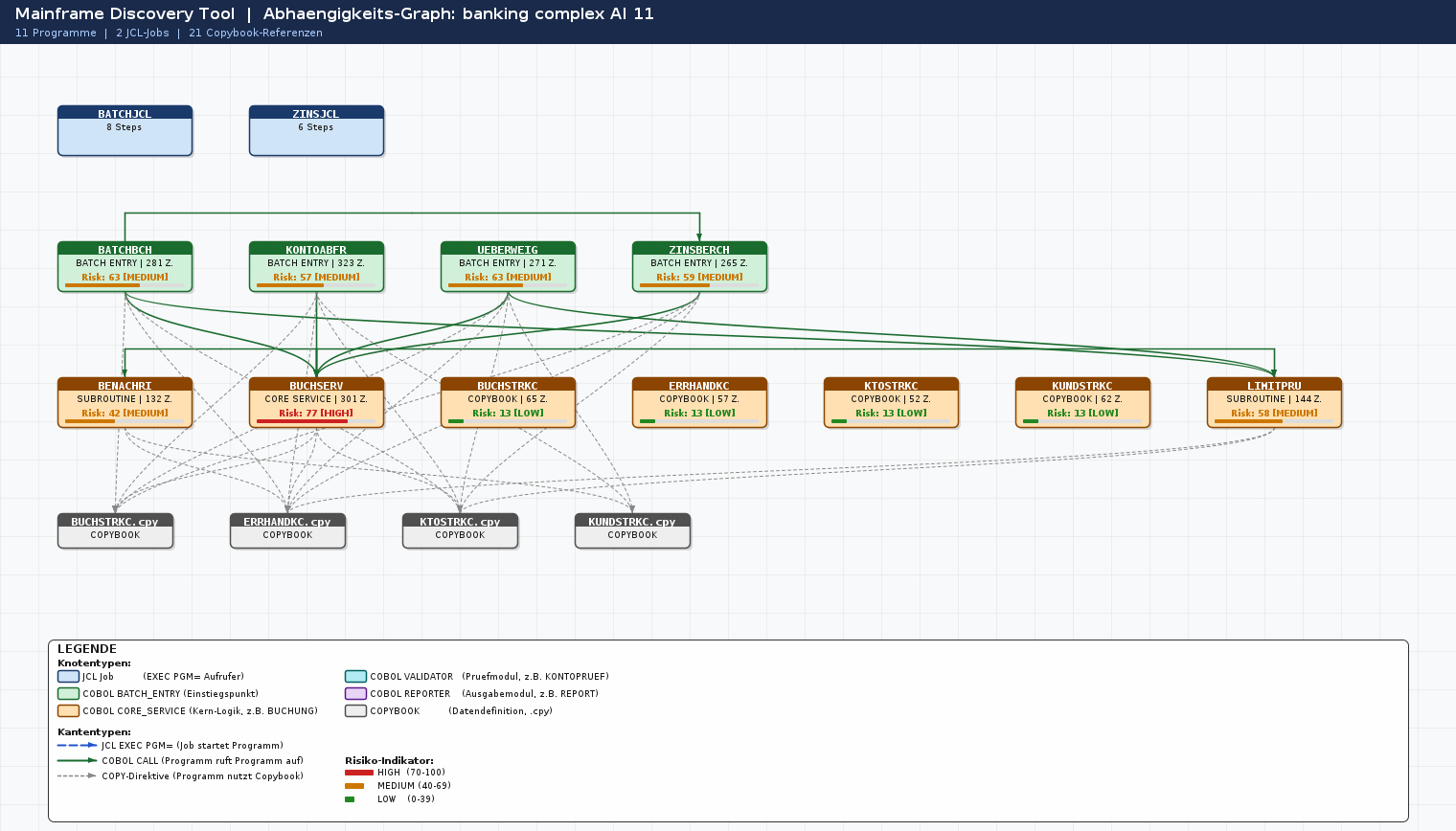
After analysis: download a PNG image for quick sharing, or a SVG vector file for detailed interactive viewing (zoom in, hover for tooltips, open in browser or draw.io).
📁 Projects
| Project Name | Programs | JCL Jobs | Avg Score | Status | Analyzed | Actions |
|---|---|---|---|---|---|---|
| Loading… | ||||||
📚 Pattern Dictionary
Click Refresh to load patterns.
👥 User Management
| Username | Full Name | Role | Status | Last Login | Actions | |
|---|---|---|---|---|---|---|
| Loading… | ||||||
🔑 Enterprise Licenses
Manage your Enterprise license keys for on-premise deployments.
Loading licenses...
⚙️ My Profile
ℹ️ About Mainframe Discovery Tool
Mainframe Discovery Tool
Version 1.0.0-MVP · Java 17 · Spring Boot 3.2 · PostgreSQL 15
An Advanced platform that automatically extracts, analyses, and documents business rules, dependencies, and risk profiles from legacy Mainframe source code — producing business-ready specifications that bridge the gap between COBOL subject-matter experts and modern Java/Spring Boot development teams.
Migration projects fail or stall because:
- Business rules are invisible in raw COBOL source
- Dependency chains are undocumented and complex
- Risk assessment per module is manual and slow
- Handover from Mainframe experts to Java teams is error-prone
- Parses all Mainframe file types from a single ZIP upload
- Generates a 10-section business spec per module ()
- Calculates a risk score (0–100) per COBOL program
- Renders a full dependency graph (PNG + interactive SVG)
- Exports PDF and Excel reports ready for stakeholder review
Copybooks · SQL
Dependency mapping
Field mappings
HIGH / MED / LOW
PNG · SVG
| 1 | Overview | Program name, type, purpose, UI, data source |
| 2 | Business Use Case | Actor, description, goal, trigger |
| 3 | Input Data | COBOL fields, working storage, validation rules |
| 4 | Database Access | DB2 tables, SQL statements, key columns |
| 5 | Business Rules | Numbered rules derived from source code |
| 6 | Data Flow | Input → Processing → Output pipeline |
| 7 | Field Mapping | Screen/JCL → Working Storage → DB Column → Java DTO |
| 8 | Error Cases | SQLCODE handling, MQ error codes, VSAM status |
| 9 | Technical Dependencies | External systems, JCL jobs, copybooks, queues |
| 10 | Ready for Implementation | Developer checklist for Java/Spring Boot migration |
| 🟦 | COBOL | .cbl .cob | Batch programs, online services, validators |
| 🟩 | JCL | .jcl | Job Control Language — batch job chains |
| 🟧 | BMS Map | .map .bms | CICS 3270 terminal screen definitions |
| ⬜ | Copybook | .cpy | Shared data structure definitions |
| 🟫 | DB2 Schema | .sql .ddl | Table definitions, foreign keys, indexes |
| 🟪 | VSAM | .cbl (FD) | Virtual Storage Access Method file I/O |
| 🔴 | MQ | .cbl (MQ) | IBM Message Queue GET/PUT operations |
| 🔵 | CICS | .cbl (CICS) | Online transactions with EXEC CICS commands |
Each COBOL module receives a risk score from 0 to 100, calculated from a weighted combination of structural complexity indicators:
| Factor | Weight |
|---|---|
| Outgoing CALL count (complexity) | 25% |
| Incoming callers (coupling) | 20% |
| Source code size (lines) | 20% |
| Copybook usage (data coupling) | 15% |
| SQL operation count (DB dependency) | 10% |
| Program type (ENTRY = higher risk) | 10% |
| Backend | Java 17 · Spring Boot 3.2 · Spring Security + JWT |
| Database | PostgreSQL 15 (H2 for test profile) |
| ORM | Spring Data JPA · Hibernate 6 |
| PDF Export | Apache PDFBox 3.x (multi-page, bookmarks) |
| Excel Export | Apache POI 5.x (8 sheets, risk-coloured) |
| Graph Export | Java2D (PNG) · SVG XML builder (interactive SVG) |
| AI Analysis | Azure OpenAI in Europe (EU data centres) |
| Security | JWT (JJWT 0.12) · BCrypt · Role-based access control |
| API Docs | SpringDoc OpenAPI 2.3 · Swagger UI |
| Container | Docker · Docker Compose · Tomcat embedded |
| Frontend | Vanilla HTML5 / CSS3 / ES6 (no framework, responsive) |
| Method | Endpoint | Description | Access |
|---|---|---|---|
| POST | /api/auth/login | Authenticate and receive JWT token | PUBLIC |
| GET | /api/auth/me | Get current user info | AUTH |
| GET | /api/analysis/projects | List all analysis projects | AUTH |
| POST | /api/analysis/upload | Upload ZIP and start analysis | AUTH |
| GET | /api/analysis/projects/{id}/export/pdf | Download PDF report | AUTH |
| GET | /api/analysis/projects/{id}/export/excel | Download Excel workbook | AUTH |
| GET | /api/analysis/projects/{id}/export/graph | Download PNG dependency graph | AUTH |
| GET | /api/analysis/projects/{id}/export/graph/svg | Download SVG dependency graph | AUTH |
| GET | /api/patterns | Read pattern dictionary entries | ADMIN |
| POST | /api/patterns | Create pattern dictionary entry | ADMIN |
| GET | /api/admin/users | List all users | ADMIN |
| POST | /api/admin/users | Create new user | ADMIN |
| PUT | /api/admin/users/{id} | Update user (role / enabled) | ADMIN |
| DELETE | /api/admin/users/{id} | Delete user | ADMIN |
AZURE_OPENAI_API_KEY), each Mainframe module is analysed by
Azure OpenAI in Europe, generating detailed business rules,
field mappings, SQL statements, and error handling descriptions.
Without a key, a robust static analysis fallback is used —
all 10 specification sections are still populated from source code structure.
⬇️ Download
Download the on-premise application package, documentation, and your license key.
Complete Docker Compose setup with environment template, Dockerfile, startup scripts, and configuration examples.
Pull the latest Docker image directly from our private registry using your customer credentials.
mainframe-discovery:latest
Complete PDF guides for installation, configuration, and operation.
🚀 Setup & Run Guide
Enterprise & On-Premise Customers:
Your dedicated account manager will provide secure initial credentials during onboarding.
Cloud Trial Users:
Create your account via the registration form. You will set your own password.
🔒 Security Best Practice: Always use strong, unique passwords (min 16 characters with symbols, numbers, upper/lowercase). Enable 2FA for admin accounts.
:8088/
:8088/swagger-ui/index.html
:5050 (--profile debug)
| Variable | Default | Description |
|---|---|---|
| 🔐 Security | ||
| ADMIN_USERNAME | admin | Administrator username — avoid generic names in production |
| ADMIN_PASSWORD | ⚠ changeme! | Strong password: min 16 chars, symbols, numbers — NEVER use default! |
| JWT_SECRET | ⚠ generate! | Generate: openssl rand -base64 64 — minimum 32 characters |
| IP_ENCRYPTION_KEY REQUIRED | ⚠ empty = error | AES key for AI consent IP encryption. Generate: openssl rand -base64 32 | head -c 32 |
| 🗄️ Database | ||
| SPRING_DATASOURCE_PASSWORD | ⚠ changeme! | PostgreSQL password — use strong unique password! |
| SPRING_DATASOURCE_URL | jdbc:postgresql://postgres:5432/mainframe_discovery | PostgreSQL JDBC URL — change host/db-name for external PostgreSQL |
| 🤖 AI Provider — Azure OpenAI (primary, EU Data Zone) | ||
| AI_ENABLED | false | Set true to enable AI-powered business rules extraction |
| DISCOVERY_AI_PROVIDER | azure-openai | Active AI provider: azure-openai (primary) or anthropic (fallback) |
| AZURE_OPENAI_API_KEY | (required for AI) | Azure OpenAI API key — from Azure Portal → your OpenAI resource → Keys |
| AZURE_OPENAI_ENDPOINT | (required for AI) | e.g. https://your-resource.openai.azure.com |
| AZURE_OPENAI_DEPLOYMENT_NAME | gpt-5-mini | Your Azure OpenAI deployment name (model alias configured in Azure Portal) |
| ANTHROPIC_API_KEY | (optional) | Anthropic Claude API key — only needed as fallback when Azure OpenAI is unavailable |
| 🔑 License & Deployment Mode (On-Premise) | ||
| ILUMENY_DEPLOYMENT_ON_PREMISE | true | Activates On-Premise UI mode (hides SaaS billing/trial/registration elements) |
| ILUMENY_LICENSE_KEY | (provided by ilumeny) | Your Enterprise license key — received during onboarding from your account manager |
"Started MainframeDiscoveryApplication" before accessing the UI.
docker compose ps
docker compose logs -f app
docker compose restart app
docker compose down
docker compose down -v
App Service Plan B2 + PostgreSQL Flexible Server. Auto-scaling, managed SSL, custom domains.
ECS Fargate + RDS PostgreSQL. Serverless containers, secrets via AWS Secrets Manager.
Cloud Run + Cloud SQL. Scales to zero, automatic HTTPS on *.run.app domain.
Ensure the application starts automatically on server reboot:
| Problem | Likely Cause | Solution |
|---|---|---|
| ERR_CONNECTION_REFUSED on :8088 | Container not running | docker compose ps → if not running: docker compose up -d |
| Upload fails — IP encryption error | IP_ENCRYPTION_KEY not set | Generate & set in .env: openssl rand -base64 32 | head -c 32 → restart |
| HTTP 403 on API calls | Missing or expired JWT | Login via POST /api/auth/login and include Authorization: Bearer <token> |
| DB connection refused | PostgreSQL not healthy | docker compose ps postgres → docker compose logs postgres |
| App starts then exits | Missing env var / wrong DB URL | docker compose logs app — verify .env file and DB credentials |
| ZIP upload fails with 400 | Invalid ZIP or >100 MB | Ensure file is a valid .zip archive and under 100 MB |
| Slow AI analysis | Azure OpenAI API call per module | Normal for 50+ programs (2–5 min). Remove AZURE_OPENAI_API_KEY for fast static mode |
| Out of memory (OOM) | Insufficient container RAM | Increase Docker memory to 4 GB minimum (Docker Desktop → Settings → Resources) |
| Platform | Recommended Approach | Setup Time |
|---|---|---|
| 🐧 Linux | Docker Compose (direct) | 10–15 min |
| 🪟 Windows | Docker Desktop + WSL 2 | 20–30 min |
| 🍎 macOS | Docker Desktop (native arm64) | 10–15 min |
| 🔷 Azure | App Service + PostgreSQL Flexible | 30–45 min |
| 🟠 AWS | ECS Fargate + RDS | 45–60 min |
| 🟡 GCP | Cloud Run + Cloud SQL | 30–45 min |
📖 Pattern Dictionary Guide
A Pattern maps a Mainframe identifier to its business meaning. The tool uses this during analysis to generate readable reports instead of raw COBOL names.
| Mainframe Key | Category | Business Meaning |
|---|---|---|
| KONTO-SALDO | COLUMN | Account balance — current ledger balance |
| WP-BUCHUNG | PROGRAM_PREFIX | Securities transaction booking |
| KUNDEN-ID | COLUMN | Customer identifier — unique CIF number |
COLUMN DB2 column names, COBOL field namesTABLE DB2 table names, VSAM file namesPROGRAM_PREFIX COBOL program name prefixes (first 4–6 chars)STATUS_VALUE 88-level condition names, return codesJCL_STEP JCL step names (EXEC PGM=)DATASET JCL dataset names (DSN=)FIELD_TYPE COBOL PIC clause descriptionsADMIN JWT token
| Method | Endpoint | Description | Use Case |
|---|---|---|---|
| GET | /api/patterns | Retrieve all patterns | Export / backup full dictionary |
| POST | /api/patterns | Create a single new pattern | Add one missing identifier |
| PUT | /api/patterns/{id} | Update an existing pattern | Correct meaning or migration hint |
| DELETE | /api/patterns/{id} | Delete a pattern | Remove obsolete entries |
| GET | /api/patterns/search?q= | Full-text search across all fields | Avoid duplicate entries |
| GET | /api/patterns/lookup?input=&category= | Look up meaning for a specific key | Verify mapping before analysis |
| GET | /api/patterns/domain/{domain} | Filter patterns by domain | Review completeness per domain |
| GET | /api/patterns/category/{category} | Filter patterns by category | Review all column or table mappings |
| POST | /api/patterns/batch | Batch import — JSON array of patterns | Initial domain setup / restore backup |
| POST | /api/patterns/domain-package/wertpapier | Install built-in Securities domain | Hundreds of pre-defined patterns |
| POST | /api/patterns/domain-package/versicherung | Install built-in Insurance domain | Hundreds of pre-defined patterns |
Use title-case with hyphens for domains: Credit-Banking, Trade-Finance. For PROGRAM_PREFIX use the first 4–6 characters that identify the functional area.
Lead with the business concept: "Credit limit — maximum approved credit line". Avoid abbreviations. For status values describe the business state, not the technical flag.
Always reference the Java class and field: "Map to BigDecimal creditLimit in CreditAccount entity. Add @Min(0)". Reference Spring annotations: @Service, @Entity, @Transactional.
Export regularly via GET /api/patterns → save JSON → commit to version control. Use one JSON file per domain. After each analysis, review unrecognised identifiers and add missing patterns.
Most efficient way to set up a new domain — import hundreds of patterns in one API call:
Securities trading, depot management, ISIN, WP_BESTAND tables.
Policy management, premiums, claims processing, insured persons.
Before running a project analysis, verify you have patterns for all high-priority categories:
💳 Billing FAQ
Common questions about subscriptions, cancellations, and payments.
Go to Billing → Open Billing Portal (Stripe). In the portal, click "Cancel subscription". Your subscription will not renew after the current billing period.
You will not be charged again, but you keep full access until the date shown in the Billing Portal. You can reactivate at any time before that date.
Your projects, analyses, and PDF reports are not deleted when you cancel. They remain for 90 days after the subscription ends.
After cancellation you can still view and download existing reports, but cannot start new analyses. If you re-subscribe within 90 days, all data is immediately accessible.
Yes. Go to Billing and click Subscribe for any plan. All your previous projects and data are immediately accessible. If your billing period has not ended yet, you can also reactivate in the Stripe Billing Portal without entering payment details again.
Stripe automatically retries failed payments up to 3 times over approximately 8 days. You will receive email notifications from Stripe at each attempt.
Monthly subscriptions are non-refundable once a billing period has started. You retain access for the full period you paid for. For exceptional circumstances contact [email protected] within 7 days of the charge.
Enterprise is managed under a signed annual contract. Cancellation terms are defined in your contract (typically 30 days written notice before renewal). Contact your account manager or [email protected]. Since Enterprise runs on your own infrastructure, your data remains on your servers after contract end.
Still have questions about your subscription?
Contact Billing Support →🔌 API Reference
Click any endpoint to expand it. Your session token is sent automatically.
Base URL: https://app.ilumeny.com
💳 Billing & Subscription
Free Trial
- Up to 3 concurrent projects
- 50 programs per analysis
- PDF + Excel export
- PNG + SVG graph export
- Interactive HTML dependency graph
- Static analysis (no AI)
- AI-powered business rules
- Pattern Dictionary API
- White-label PDF reports
Professional
- Unlimited projects & programs
- AI-powered analysis (Azure Europe)
- DSGVO / GDPR compliant by design
- Dead Code Detector
- GDPR Scanner — PII auto-detection
- Risk Scoring (0–100 per program)
- PDF + Excel + PNG + SVG export
- Interactive HTML dependency graph
- White-label PDF reports
- Pattern Dictionary (managed)
- REST API access for CI/CD
Enterprise
✓ Flexible payment terms available
- Everything in Professional
- On-premise deployment (Docker)
- SSO / SAML integration
- Azure Germany (data residency)
- SLA with guaranteed response time
- Dedicated account manager
- Custom domain pattern packages
- Team training & onboarding
Manage your subscription: change plan, update payment method, download invoices, or cancel.
Cancel anytime. Access continues until the end of your current billing period. Learn more →